
SQL SET ROWCOUNT
The SQL ROWCOUNT is a SQL Server SET statement which causes SQL Server to stop processing the query after the specified number of rows are returned

I have 11+ years of working experience in Business Intelligence Data Modelling, Power BI, SQL Server, SSRS, SSIS, Azure Data Factory, Power Apps.
The SQL ROWCOUNT is a SQL Server SET statement which causes SQL Server to stop processing the query after the specified number of rows are returned

SQL Server SET NOCOUNT ON/OFF statement that controls the behaviour in SQL Server to shown the number of affected rows in the T-SQL query.

The SQL GOTO statement is used to alter the flow of execution. When the execution reaches the GOTO statement.

A Subquery is a query within another query. The outer query is called as main query and inner query is called as subquery. A subquery (inner… Read More »SQL Subquery

The SQL EXISTS Operator is used to check the existence of any record in a subquery. The EXISTS operator returns true if the subquery returns… Read More »SQL EXISTS Operator

Using SQL Server BULK INSERT(BCP) statement you can perform large imports of data from text, or Csv files to SQL Server table, or Views. Basically,… Read More »Bulk Insert in SQL Server
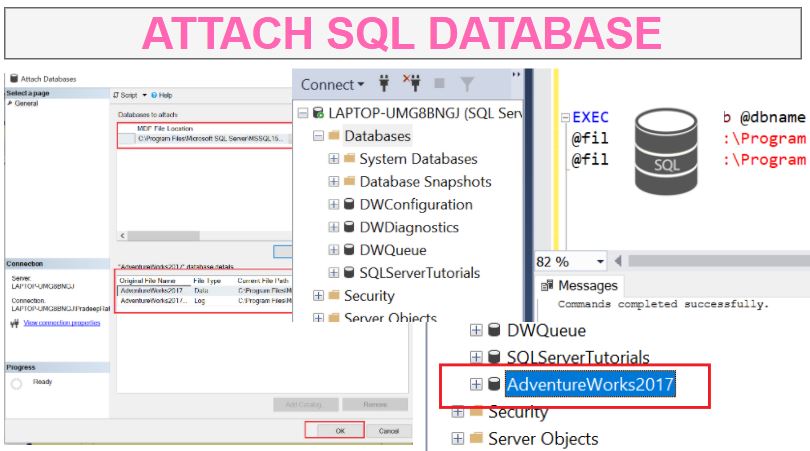
Detaching and attaching a SQL database, is helpful in case in case when you want to move to move a database to a different SQL Server instance. So Bascially, first we detach database from SQL Server and move those files to another SQL Server and then attach files.

SQL Detach Database, when you detach a database from SQL Server, database is removed from the instance of SQL Server but kept the database intact within its data files and transaction log files.

According to Microsfot, Azure Data Factory is Azure’s cloud ETL service for scale-out serverless data integration and data transformation. It offers a code-free UI for intuitive authoring and single-pane-of-glass monitoring and management.

The DEFAULT constraint is used to provide a default value for a columns, when the INSERT INTO statement does not provide a specific value to columns.

Create Azure SQL Database
Microsoft Azure SQL Database is a managed cloud database provided as part of Microsoft Azure. A cloud database is a database that runs on a cloud computing platform, and access to it is provided as a service. It gives a high performance without having to worry about any infrastructure.

To Create an Azure SQL Database Server, Go to Home Page then search for SQL Servers in Search bar, click on SQL Servers in search… Read More »Create Azure SQL Database Server

Create Azure Data Factory
The Azure Data Factory service is a fully managed service for composing data storage, processing, and movement services into streamlined, scalable, and reliable data production pipelines

Loading a Data from Azure Data Lake Storage to Azure Data Lake Database requires an azure data lake storage. So you must have a file… Read More »Load Data from Azure Data Lake Storage to Azure database

Create a Schema and table in Azure Data Lake Database

Create an Azure Data Lake Database
Azure Data Lake Analytics comes with a catalog that comes with a Master Database, you can also create your own database.

Upload Files to Azure Data Lake Storage Uploading a files to Azure Data Lake Storage can be done either using Azure Portal or Azure Storage… Read More »Upload files to Azure Data Lake Storage

Create a Azure Data Lake Storage Account
Microsoft Azure Data Lake is a highly scalable public cloud service that allows users to gain insight from large, complex data sets.

SQL Server Cross Apply and Outer Apply
SQL Server APPLY operator is like a SQL JOINS, which allows joining two table expressions, but the Difference between APPLY operator and JOINS is the ability of APPLY operator to work with table- valued expression.
